PSD Import and Export
Resprite can import supported .psd content as a project and export the selected frame as a layered PSD. Keep the .resprite original when you need animation or Resprite-specific editable features.

Import PSD files
Use the standard import/open flow to bring a layered PSD into Resprite. Supported content is converted into a Resprite project; saving it does not automatically update the original PSD. Desktop/Android import requires v1.29.2+, and iOS import requires R53+.
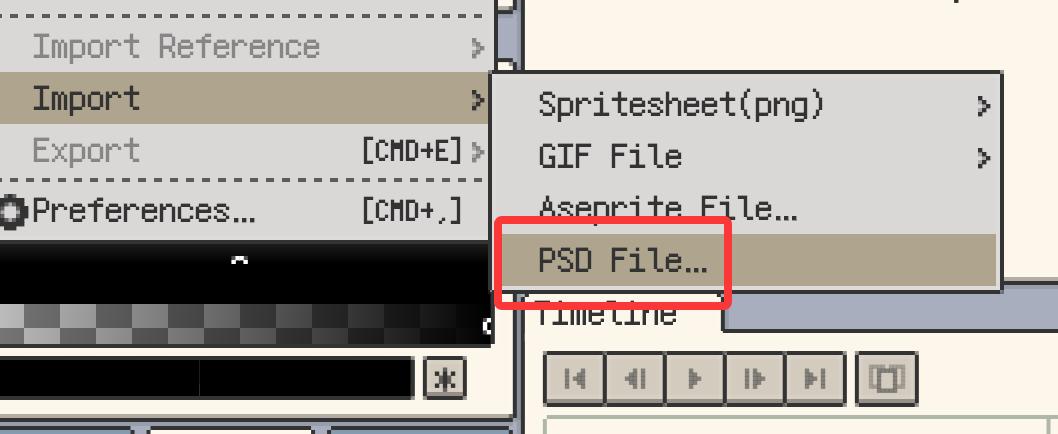
Very large PSDs are checked before import to limit memory allocation. PSD support does not mean every Photoshop-specific feature can be edited in Resprite. Compare the imported layers and appearance with the source file.
Exported PSD content
- Layers and layer groups
- Unicode layer names
- Layer and group opacity and blend modes
- Image-layer clipping masks
- Visibility from each layer's own eye state

Only the selected frame is exported. The PSD does not contain the timeline animation. Temporary global eye states used while editing do not override each layer's saved visibility in the export.
Content that changes or is omitted
| Content | Export result |
|---|---|
| Tilemap layers | Rendered as ordinary pixel layers; tilemap structure and tileset resources are not preserved. |
| Live layer styles, such as Stroke and Shadow | Skipped, without automatically baking the effect into pixels. |
| Group clipping masks | Not retained. Image-layer clipping masks are supported separately. |
| Reference images | Not included. |
| Other animation frames | Not included; only the selected frame is exported. |
If a layer style's appearance needs to be included, duplicate the project and rasterize the style in the copy before export. Check the result in the destination app and keep the original project.
App compatibility
Exported PSDs have been tested with Adobe Photoshop, Krita, GIMP, Procreate and Clip Studio Paint. These checks do not establish compatibility for every feature combination or app version. Reopen the exported file in your destination app and compare layers, clipping and blending before continuing.
Availability
- Desktop and Android export: v1.28.0+
- Desktop and Android import: v1.29.2+
- iOS export: R51+
- iOS import: R53+
See Export a layered PSD for the short procedure, or Saving imported projects for the import/export workflow.