Resprite DA v1.30 changelog
v1.30.2
Release date: May 10 2026
New
- New: Added Grayscale Preview for the canvas and preview, making it easier to check value relationships without changing artwork.
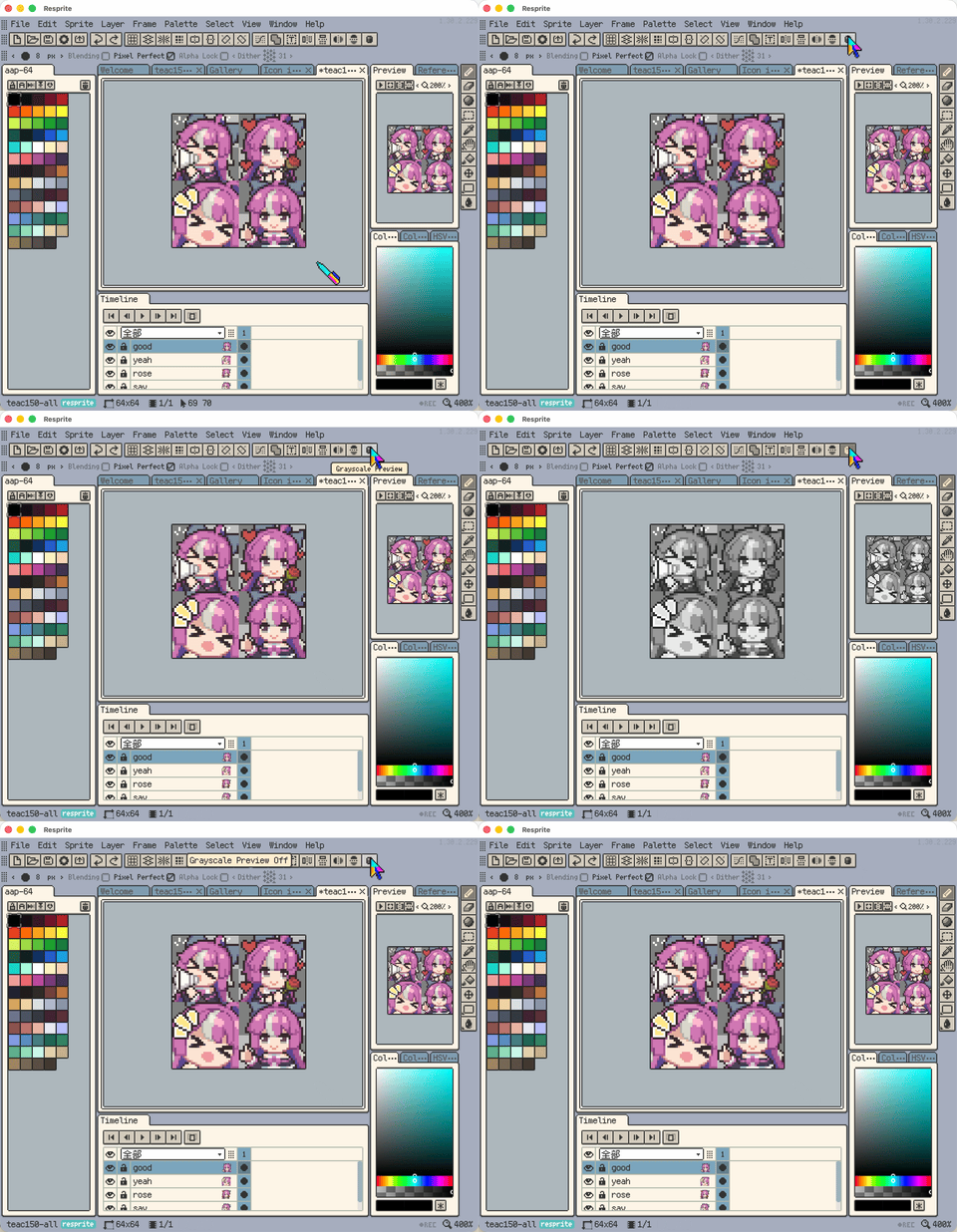
Grayscale Preview on the canvas and preview
- New: Theme settings now include more options for panel spacing, tab spacing, visual factors, base colors, and header modes.
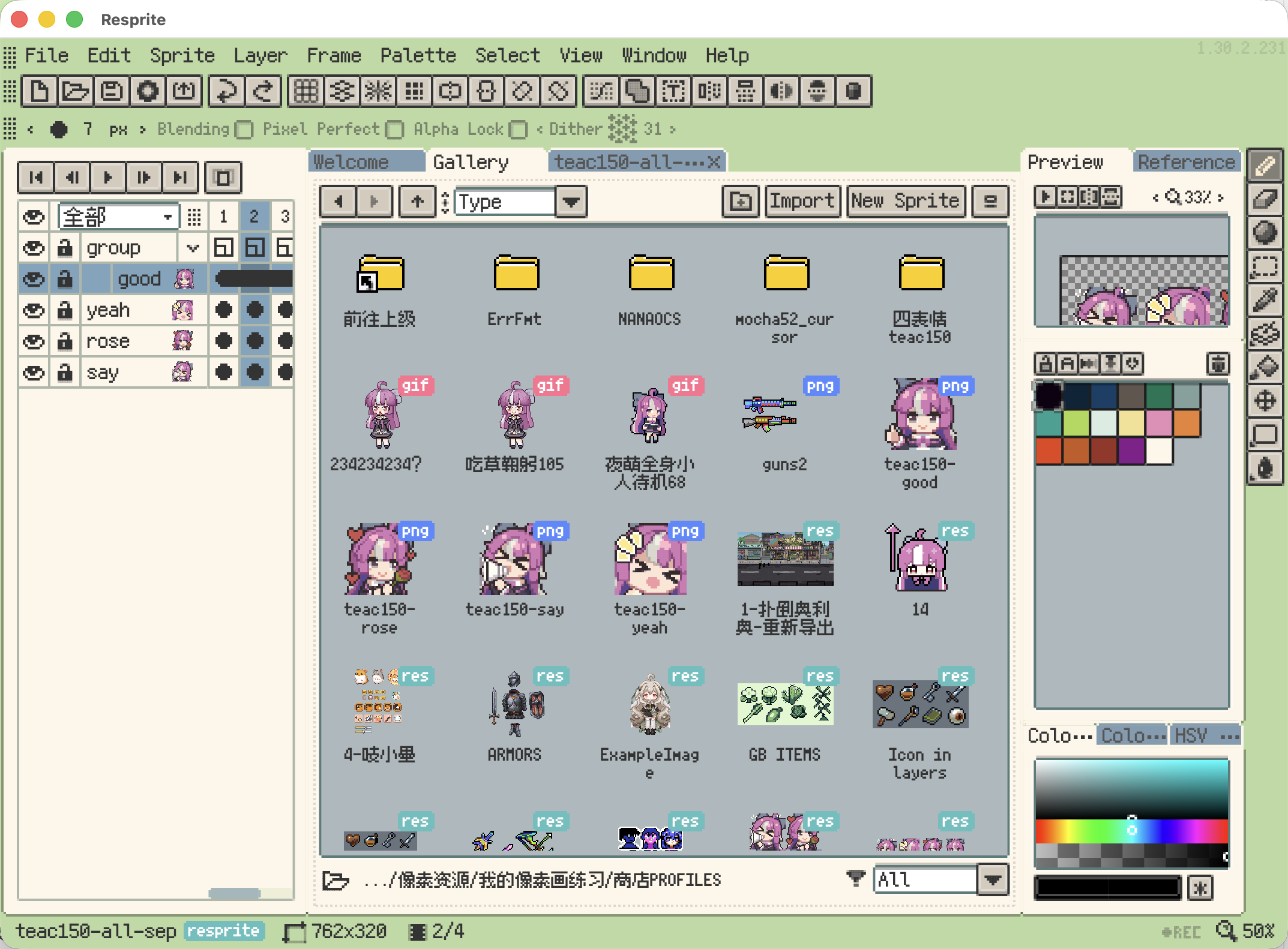
New theme options
- New: Themes now support a Single-Window Header Mode. Single-window panels can switch between Normal, Full-Width Title, and Hidden Title.
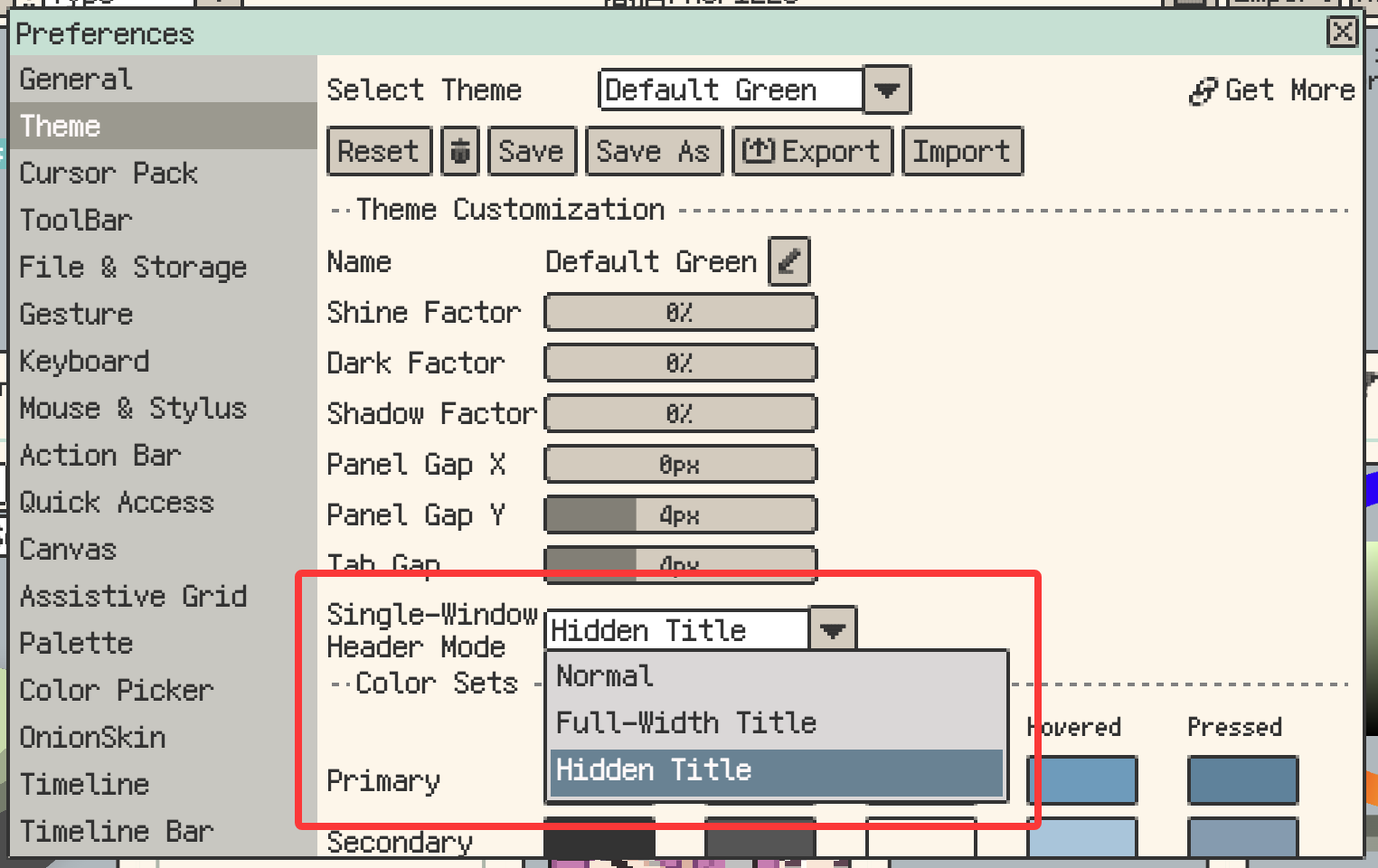
Single-window header modes
- New: Workspace Layout Lock now supports a shortcut, and the layout menu naming is clearer.
- New: Palette Reorder/Sort now supports Smart Grouping, so sorted colors can be arranged into more natural grouped rows.
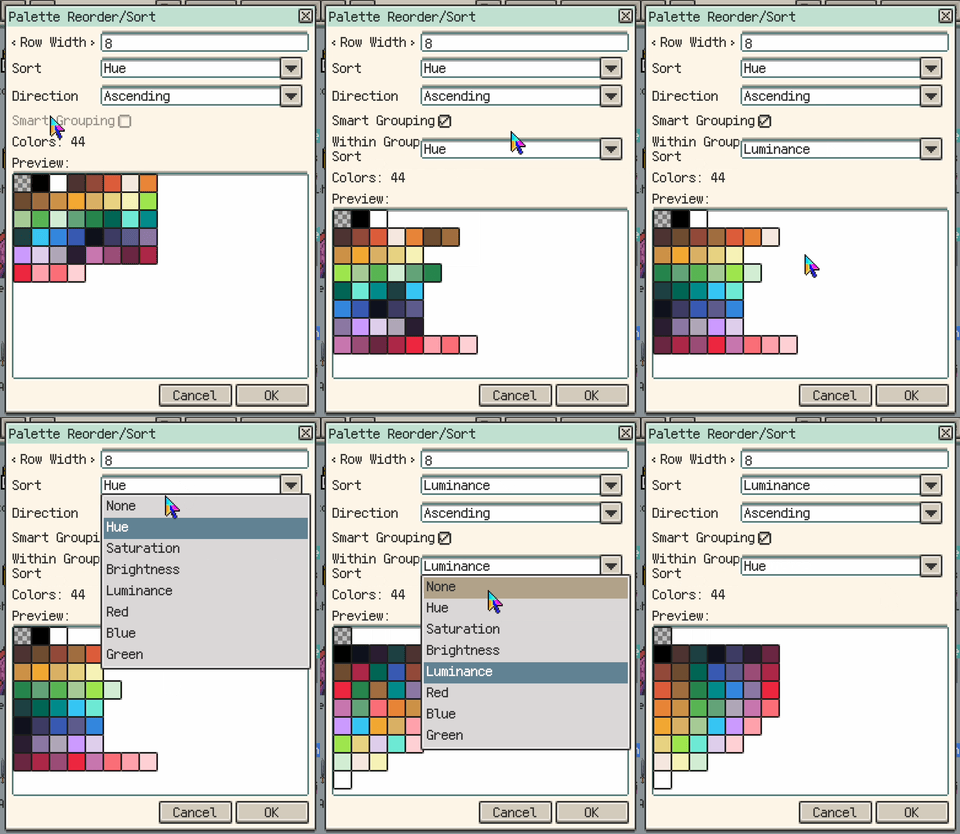
Smart Grouping in Palette Reorder/Sort
Improvements
- Improvement: The status bar zoom control now supports more quick actions.
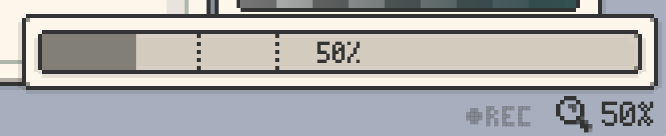
More quick actions in the status bar zoom control
- Improvement: The Theme settings layout is cleaner, and theme selection plus related actions are arranged more clearly.
- Improvement: The Theme settings Save button now marks unsaved edits, including after the app restarts with unsaved theme state.
- Improvement: Theme color tuning now compares more directly against the real main-window colors.
- Improvement: Theme active outlines are now controlled in one place, while keeping exported-theme compatibility with older versions.
- Improvement: Built-in themes now have a more consistent visual style.
- Improvement: Grayscale adjustment values are now more accurate.
- Improvement: Single-tab panel drag previews are now more consistent when the drop target would not change the visible layout.
- Improvement: Split-layout dividers now snap to nearby gaps, making panel alignment easier.
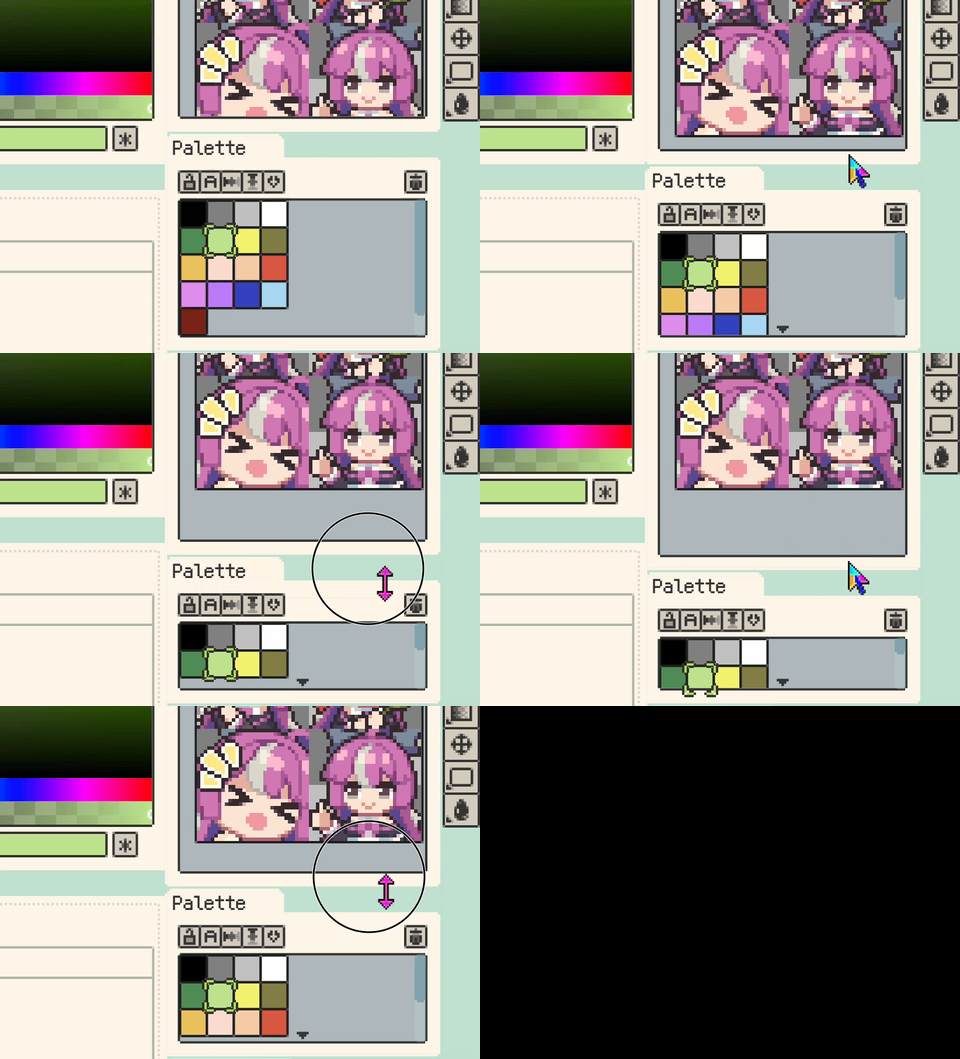
Split-layout divider snapping
- Improvement: Desktop color entry points now support easier HEX copy and paste from color edit buttons, Pen Color, palette slots, and the Material Sphere base color.
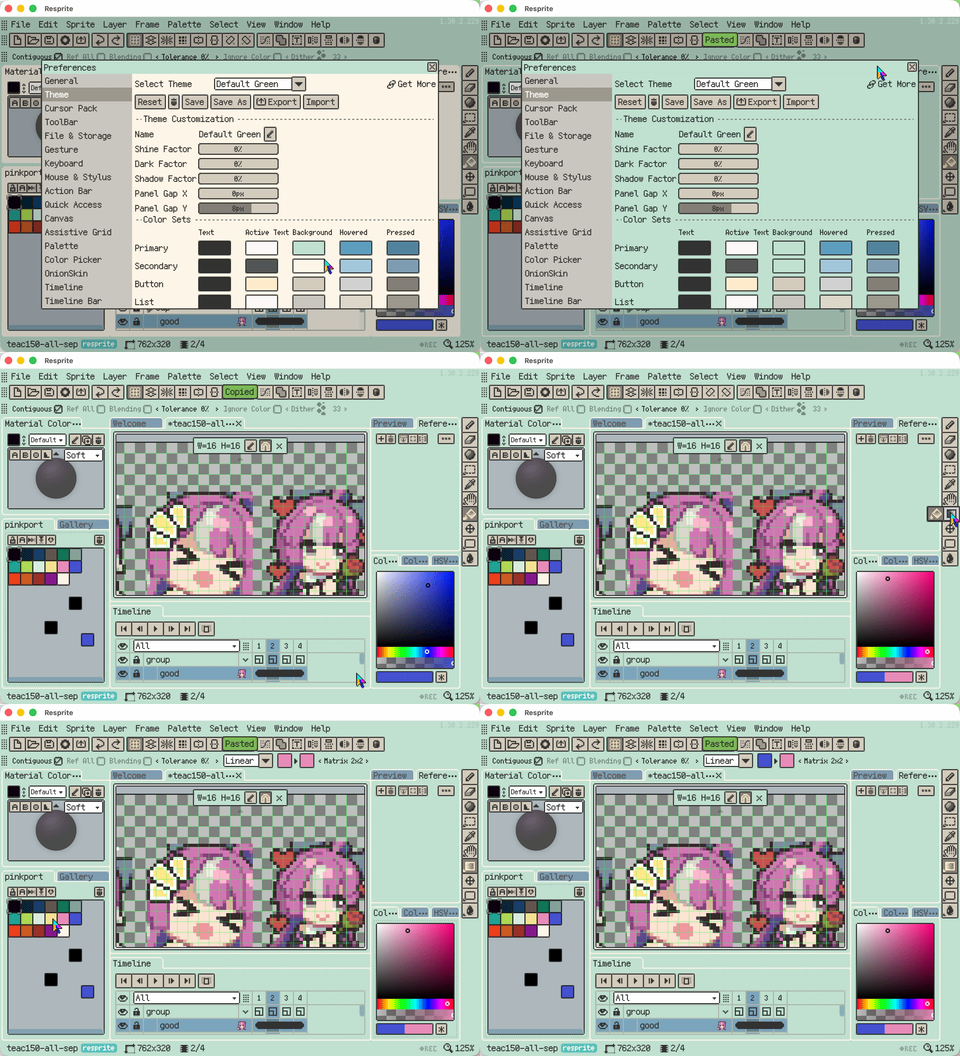
HEX copy and paste from color entry points
- Improvement: Common edit menu actions now show Cut, Copy, Paste, and Delete icons.
- Improvement: Palette Reorder/Sort now previews the result before applying, supports ascending/descending order, adds Luminance sorting, and can sort only the selected colors in a multi-cell selection.
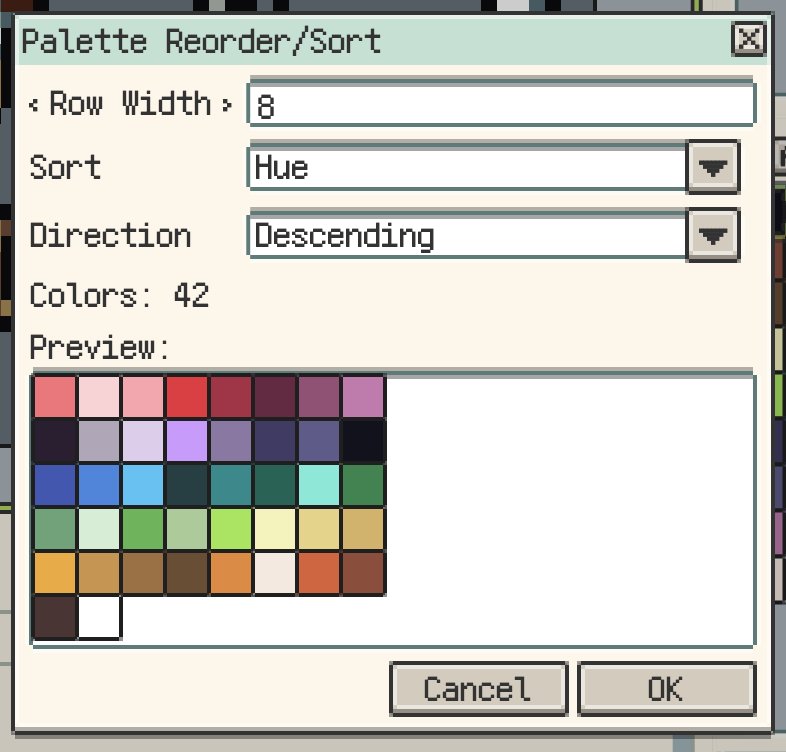
Preview and sort options in Palette Reorder/Sort
Fixes
- Fix: Desktop tab and panel right-edge joins are now cleaner when tabs fill the row or a panel uses Full-Width Title.
- Fix: Panel and tab shadows no longer overlap neighboring panels when panel spacing is small.
- Fix: Window highlights, dark edges, and outer shadows in Settings, Help, and similar dialogs are no longer hidden by content.
- Fix: Blank
.respritethumbnails now show the placeholder.
v1.30.1
Release date: Apr 20 2026
New
- New: Added
Detect Scalein Sprite Size, so Resprite can suggest an integer-upscaled target size automatically.
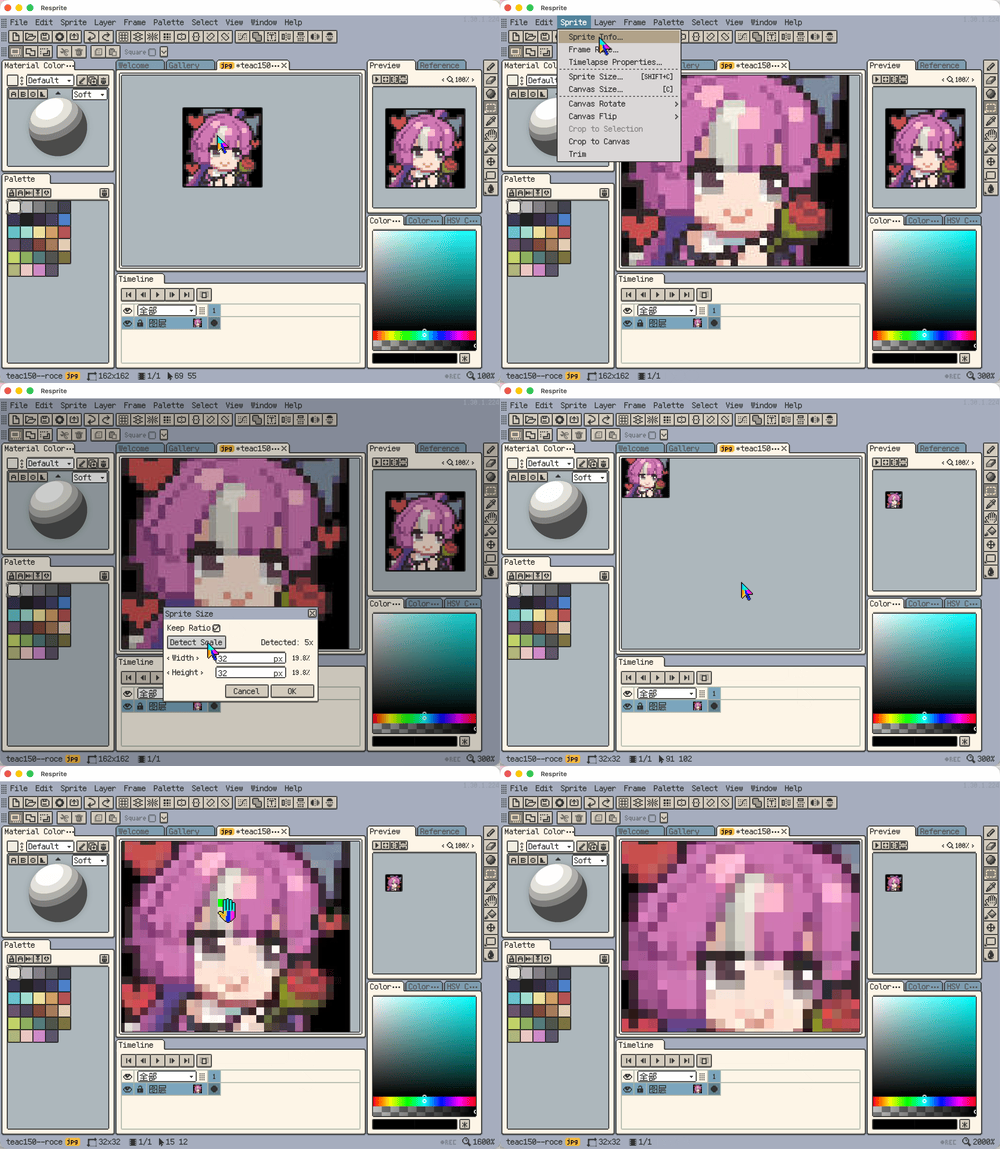
Detect Scale in Sprite Size
- New: Desktop shortcut settings now support custom
key + wheelbindings, with import, export, and default reset.
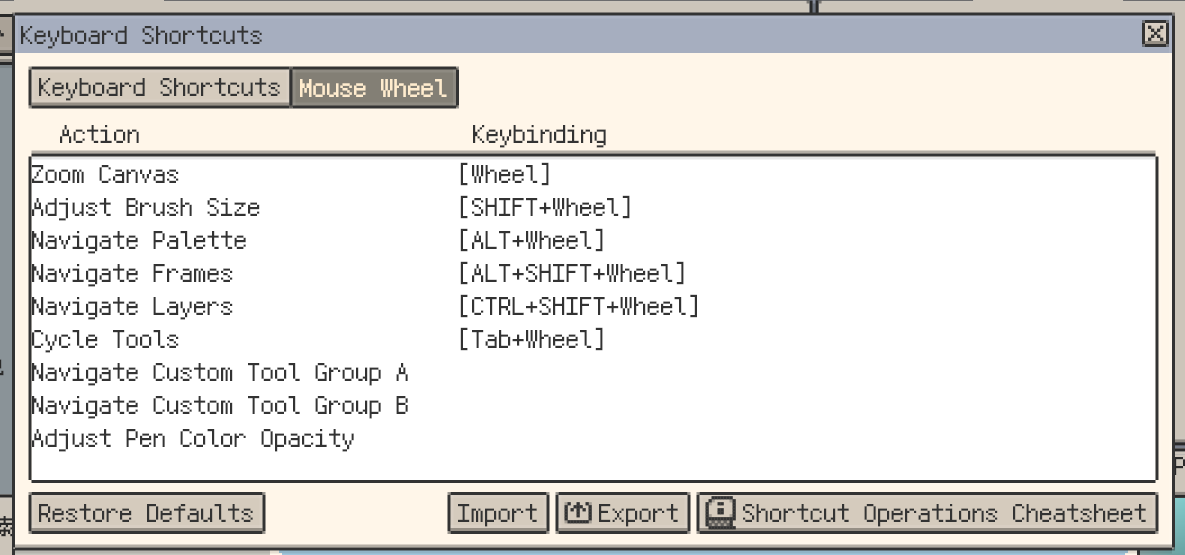
Custom key and wheel shortcut bindings
- New: Added ellipse selection. Rectangle and ellipse selections now both support center drawing, and
Shiftcan lock proportions or switch to Add mode.
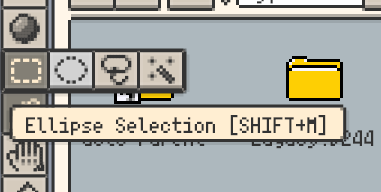
Ellipse selection and center drawing
Improvements
- Improvement:
.rescurs/.rescurcursor packs can now be opened directly from Finder or File Explorer. - Improvement: Canvas viewport constraints are more stable after zooming, dragging, or resizing.
- Improvement: Unified
Fit to Viewwording across related surfaces. - Improvement: Unified canvas, preview, and reference zoom steps down to 1%.
- Improvement: Insert Text now supports
.otf, and same-name.ttf/.otffonts can be previewed and inserted separately. - Improvement: Reorganized shortcut settings categories and ordering, and split Layer and Frame entries.
- Improvement: Desktop shortcut cheatsheets are cleaner, with more consistent wording.
- Improvement: Exported shortcut cheatsheets now include shortcuts, wheel actions, gestures, and modifier behaviors in one sheet.
- Improvement: Removed the old Help-menu cheatsheet to avoid overlap with the new exported cheatsheet and Quick Start.
- Improvement: Timeline clip selection and edge dragging now feel smoother.
- Improvement:
Merge Visibleon desktop is now more intuitive. - Improvement: Bead Pattern export now supports separate major/minor grid colors and widths, and remembers the last-used style.
- Improvement: Unified Gallery naming for Duplicate and Copy/Paste.
- Improvement: The GPL palette row-width dialog now previews layouts in real time.
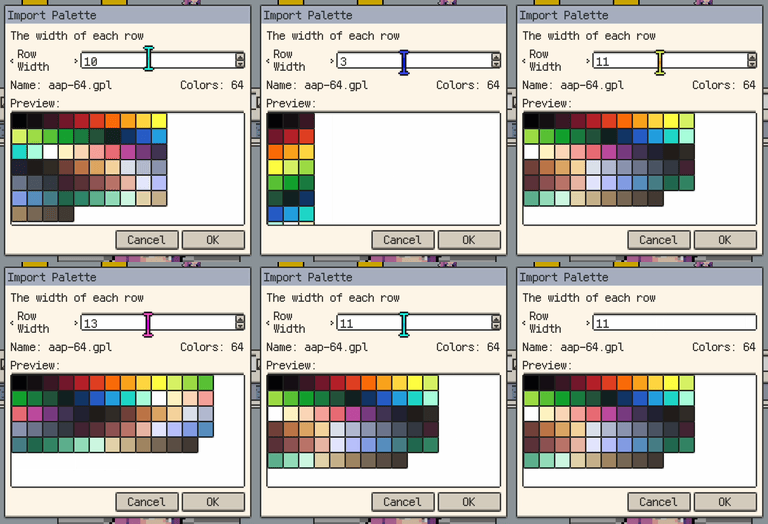
Real-time preview in the GPL palette row-width dialog
- Improvement: Added
Clear Recentto recent projects. - Improvement: Layer-selection blink is now softer and stays focused on the final layer during rapid switching.
Fixes
- Fix: Fixed timeline clicks incorrectly limiting whole-sprite adjustments, outlines, and moves.
- Fix: Fixed occasional duplicate palette import on macOS cold start.
- Fix: Fixed broken back/forward history after
Go to Parentin Gallery. - Fix: Fixed Bead Pattern preview border and major/minor grid option sync.
- Fix: Fixed Gallery view mode resetting after restart on Android.
- Fix: Unified file type badges in desktop Recent and small-grid Gallery views.
- Fix: Fixed invalid file names when exporting by layer.
- Fix: Improved layer identity stability to reduce timeline issues after duplicate and undo/redo.
- Fix: Layer selection from the canvas now scrolls to the correct visible position when clip rows are shown in the timeline.
- Fix: Desktop palette clicks no longer fall into multi-select because of slight pointer wobble.
- Fix:
.respritesaving now validates pixel consistency and keeps the original file on failure. - Fix: Fixed incorrect display of long color names.
- Fix: Dragging a GPL palette into the current palette panel on desktop now asks for row width first.
- Fix: Fixed cut-then-paste in the same Gallery folder being renamed incorrectly on desktop.
- Fix: Fixed normal folders with dots being mistaken for project items.
- Fix: Fixed Gallery parent entry and Android file-name display in grid views.
- Fix: Faster palette generation from large images/reference images, with lower ANR risk.
- Fix: Fixed Android tools acting as if
Shift/Ctrlwere pressed without a physical keyboard. - Fix: Canvas position is now more stable after
Sprite Sizeand undo/redo.
v1.30.0
Release date: Mar 25 2026
New
- New: Added
Export Againon Desktop, so you can quickly reuse the previous export location and settings.
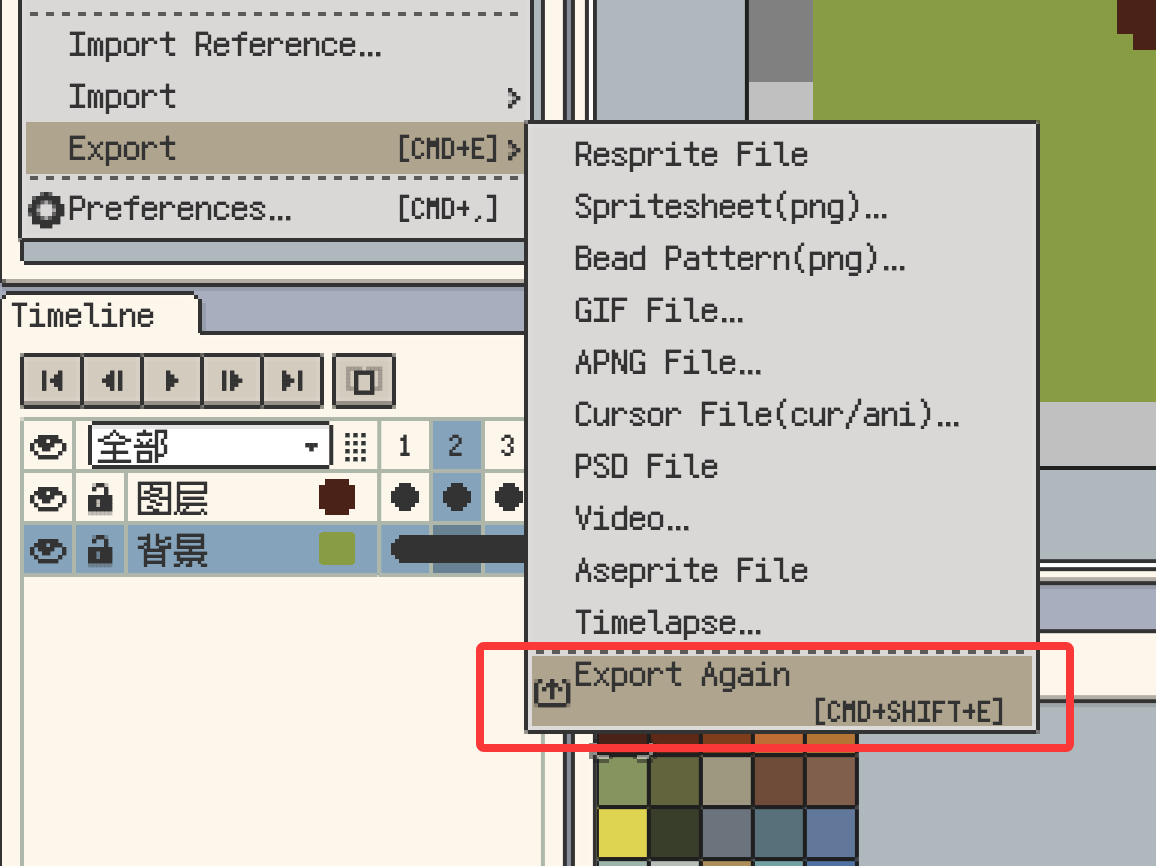
Export Again on desktop
Improvements
- Improvement: Added a
Sprite Sizeshortcut action for faster access to sprite size settings. - Improvement: Cursor export hotspot editing now uses a clearer workflow: the main preview is view-only, and hotspot editing happens in a separate window.
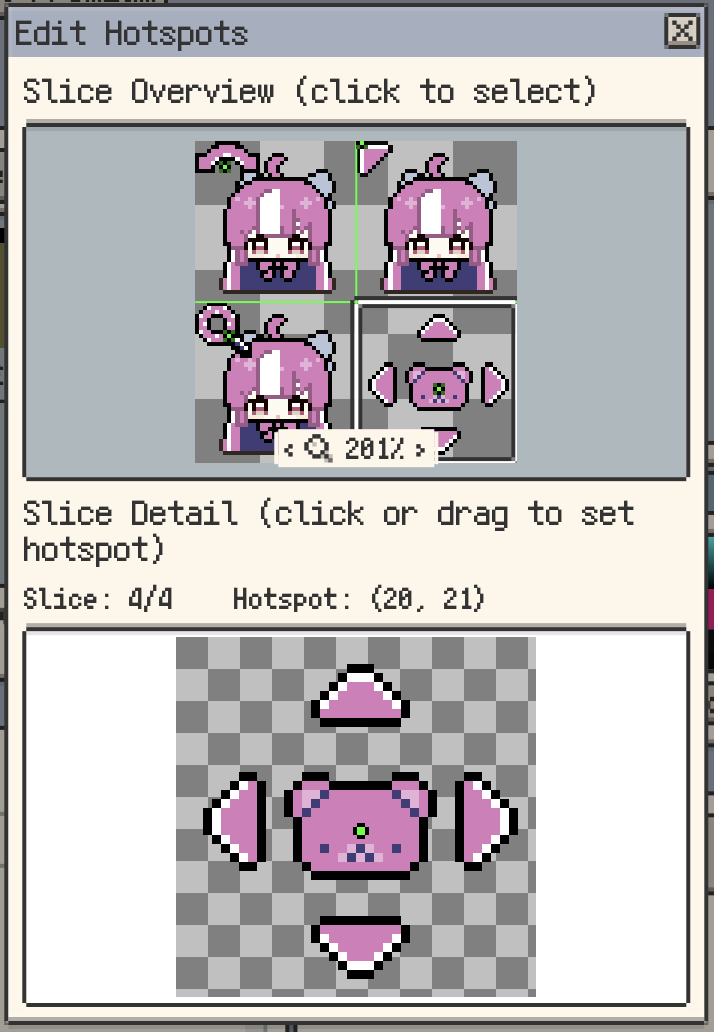
Cursor hotspot editing in a separate window
- Improvement: Export type order is now consistent across the File menu, export dialog, and Gallery export menu.
- Improvement: You can now import palettes from web links and app deep links.
- Improvement: Lospec
Open In Apppalette import is now supported.
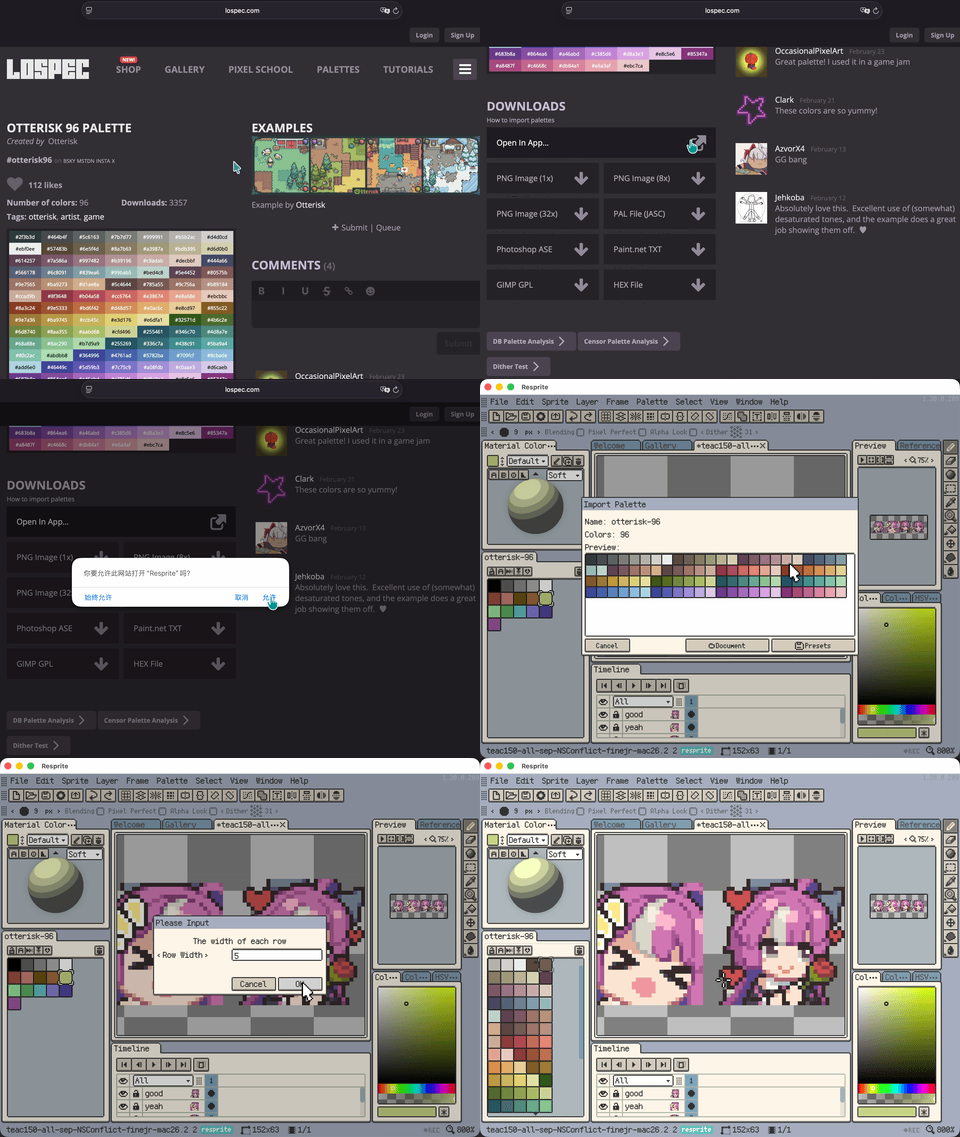
Import palettes from Lospec Open In App
- Improvement: Trusted remote resource domains can now be managed in one place.
- Improvement: Added
Close Moreto the canvas tab menu, with options to close other/left/right files. Batch closing now uses one consistent save confirmation flow.
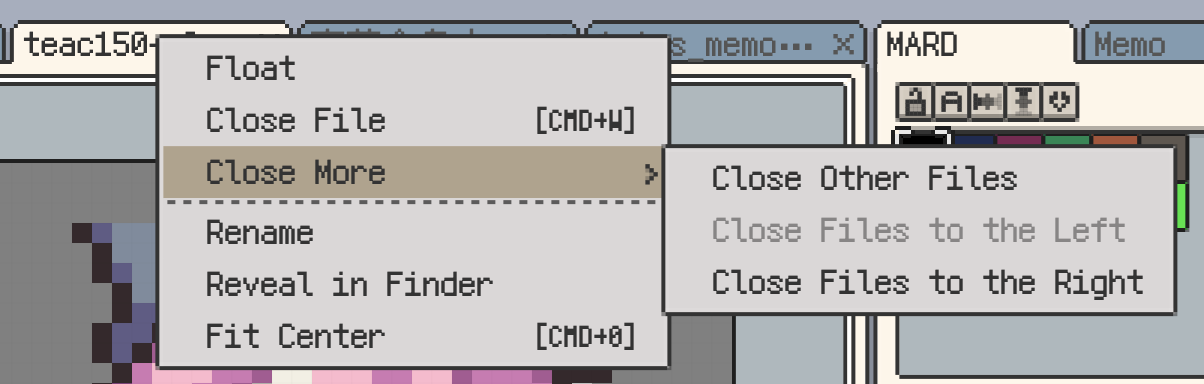
Close More options in canvas tabs
- Improvement: Timeline frame duration markers now switch to a line when there are many, making dense timelines easier to read.
- Improvement: Isometric grid snapping is now more stable on diagonal directions, improving placement accuracy.
- Improvement: Directional movement with grid snapping is now more consistent between arrow keys and move buttons, with clearer direction mapping.
- Improvement: Bead pattern export adds a
Show color namestoggle to control whether color names appear in the main grid. - Improvement: Added an
Enable PNG High DPItoggle in Settings.
Fixes
- Fix: Reduced ANRs in some fill, paste, and export scenarios.
- Fix: Horizontal wheel tilt no longer triggers zoom by mistake.
- Fix: Fixed an issue where some PSD files could incorrectly show a format error when importing.
- Fix: Fixed occasional slice position offsets during cursor pack export; preview and exported results now match.
- Fix: Fixed an issue where selection contents could not be dragged from inside an existing selection in Add mode.
- Fix: Fixed incorrect behavior in negative-value fields when entering negative numbers.
- Fix: Fixed an occasional text history issue when redo was triggered right after text insertion.
- Fix: Prevented clearing the document when deleting the last layer/frame, and reduced undo/redo history issues.
- Fix: Fixed a rendering mismatch where undoing overlapping rectangle fills could temporarily hide overlap pixels until layer visibility was toggled.
- Fix: Fixed material sphere pick-point drift after window resizing.
- Fix: Fixed low readability of resfont virtual keyboard text under dark themes.
- Fix: Fixed an occasional Windows crash related to thumbnail cache handling.
- Fix: Improved startup robustness so config corruption, directory issues, or port conflicts are less likely to block launch.
- Fix: Improved PNG save compatibility to reduce open issues in some apps.
- Fix: Fixed an occasional issue on Windows where shortcuts and editing actions became unresponsive after returning to the app.
- Fix: Fixed an occasional issue on Windows where the first
Ctrl+Shift+Safter Save As would not respond.