Resprite iOS R55: Workspace Layouts, Detect Scale, and Ellipse Selection
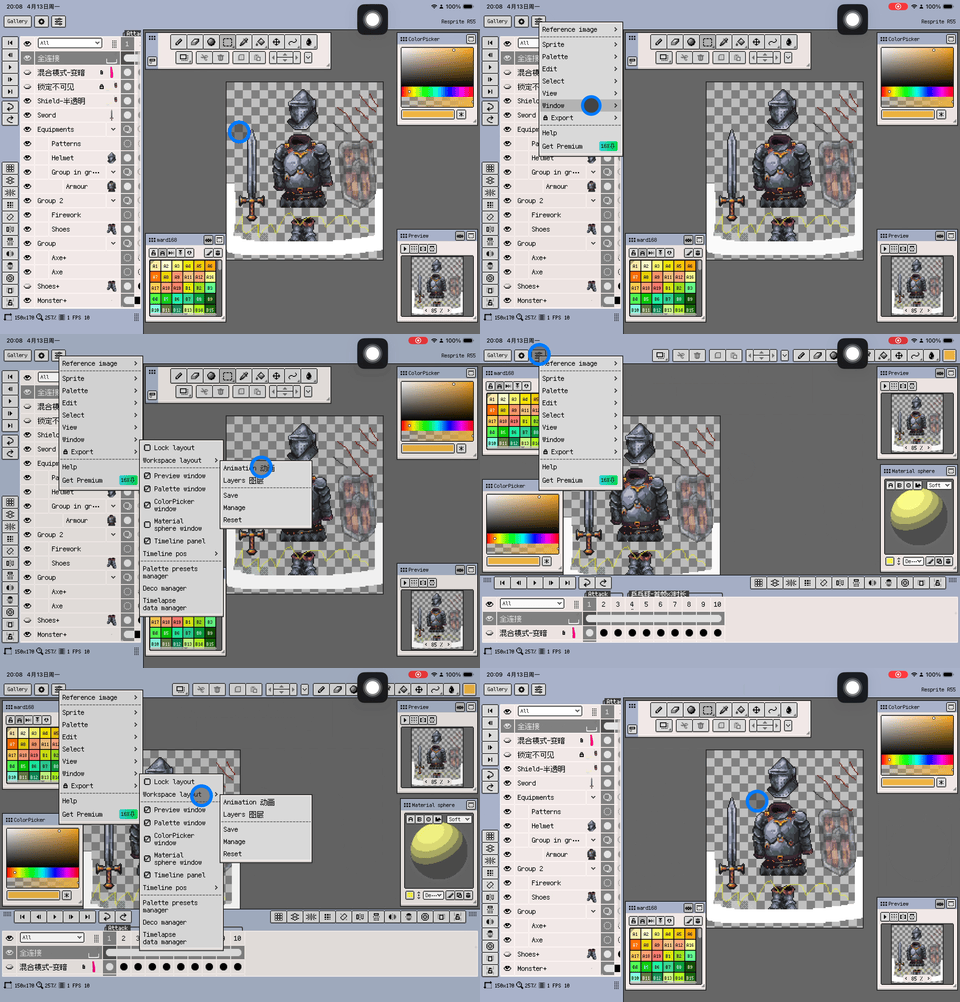
Resprite iOS R55 is now available. This release focuses on reducing setup friction and improving visual accuracy during editing. Workspace Layouts let you switch between saved panel setups, Detect Scale helps recover a cleaner base size after importing enlarged art, ellipse selection broadens fast masking workflows, and the new eyedropper loupe makes sampling from the canvas or reference images easier to trust. R55 also refines palette imports, preview-window controls, layer picking, and several Material Sphere undo flows.
New
-
Added Workspace Layouts for saving, managing, and loading multiple window arrangements, making it easier to switch quickly between different creation setups.
-
Added Detect Scale to the Sprite Size dialog. It can try to detect the integer upscale factor of the current frame and automatically fill in a width and height that are better suited for continued pixel-by-pixel editing.

-
Added an ellipse selection tool with the same Replace / Add / Subtract modes as the marquee tool, plus perfect-circle constraint, draw-from-center support, and a keyboard shortcut for switching.
-
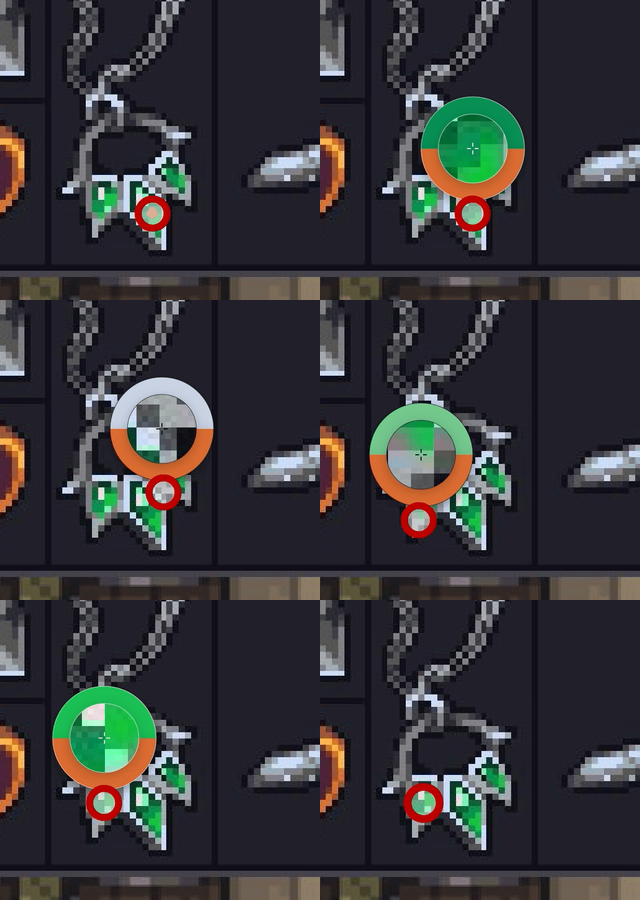
Added an eyedropper loupe while picking colors. It now shows a magnified pixel preview, a crosshair for the current sample point, and a new/previous color ring when picking from both the canvas and reference images.
Improvements
- When grid snapping is active, live pixel size readouts for selection and shape tools are hidden to avoid conflicting with grid-step-based interaction.
- GPL palette imports now show a live row-width preview first, so you can confirm the final layout before choosing Replace or Append.
- Palette Presets Manager now shows real preset filenames and keeps extensions such as
.rpland.gpl, making palette formats easier to distinguish. - The Palette Presets popup now uses a larger default size and a smoother system scroll view, with unified inner-border, background, and selection styling so large preset lists are easier to browse.
- Palette imports to the current file and to presets now follow the desktop naming rule and consistently use the source filename.
- GPL palette import previews now show the source filename, making it easier to confirm which file is being imported.
- Unified Gallery naming rules for duplicate and copy/paste. Duplicate now creates an “original copy” style name, while copy/paste keeps the original name whenever possible and only appends a sequence number when the destination folder already has a conflict.
- The Insert Text font list now uses natural sorting by display name, so fonts with uppercase and lowercase initials stay grouped together.
- When canvas-based layer picking targets a layer inside collapsed groups or outside the current timeline viewport, ancestor groups now auto-expand and the timeline scrolls to reveal that layer.
- The CFT collapse button now lives inside the panel, and the restore button now uses a clearer flat style with better placement and finger hit accuracy in both top and bottom docking layouts.
- Refined some multilingual UI strings for import, remote resource permission, and 45° symmetry menus, including capitalization cleanup and translation fixes.
- Batch export can now stop after the current file finishes when canceled. All cancellable loading panels now show
Canceling...and display aCanceledtoast after cancellation actually completes. - Reorganized the helper-drawing entries in the View menu. Tiled Mode is now shown in its own submenu below Symmetry Tool, while Reset to Center has been moved into the bottom of the Symmetry Tool submenu with a divider, making the main menu shorter and related actions easier to find.
- Added an action bar toggle to the Preview window header and moved Tiled Mode and Preview Play into that action bar, reducing header button clutter while keeping the last action-bar visibility state.
- Added horizontal and vertical mirror toggles to the Preview window action bar. Regular preview and tiled preview now follow the same mirror state, making it easier to inspect left-right or top-bottom flipped compositions.
- Unified zoom steps and minimum zoom ranges across canvas, preview, reference image, and in-canvas reference image. They can now all zoom out to 1%, and double-tap / fit-to-view cycles now use the same zoom steps.
Fixes
- Capped persisted cursor export hotspot memory so large slice documents no longer keep inflating the saved export config.
- On iPad, when Show Larger Transform Handles is off, the corner, edge, rotation, and proportional-scale handles in selection free transform could be hard to grab with a finger and taps could fall through. They now keep the original visual size while using the larger-handle touch target.
- Color detail edits for directional lights and ambient light in the Material Sphere could be split into multiple undo entries during a single popup session. They are now merged into one color-change step when the detail popup closes.
- After undo or redo in the Material Sphere, the color-button previews for the main directional light, fill light, and ambient light could stay on stale colors. The button previews now stay in sync with the sphere render and the active profile state.
- Multiple taps and drags inside a single Material Sphere light-direction popup session could be split into multiple undo entries. They are now merged into one direction-adjustment step when the popup closes.
Thanks for reading and for your continued support. If you have feedback or suggestions, please contact us.