Resprite DA v1.30.1: Detect Scale, Ellipse Selection & Wheel Shortcuts
Resprite DA v1.30.1 is a compact but meaningful workflow update. This release adds Detect Scale in Sprite Size, ellipse selection, and custom key-plus-wheel shortcuts on desktop, then follows through with a long list of practical improvements across canvas handling, palette import, Gallery behavior, exported shortcut sheets, and stability.
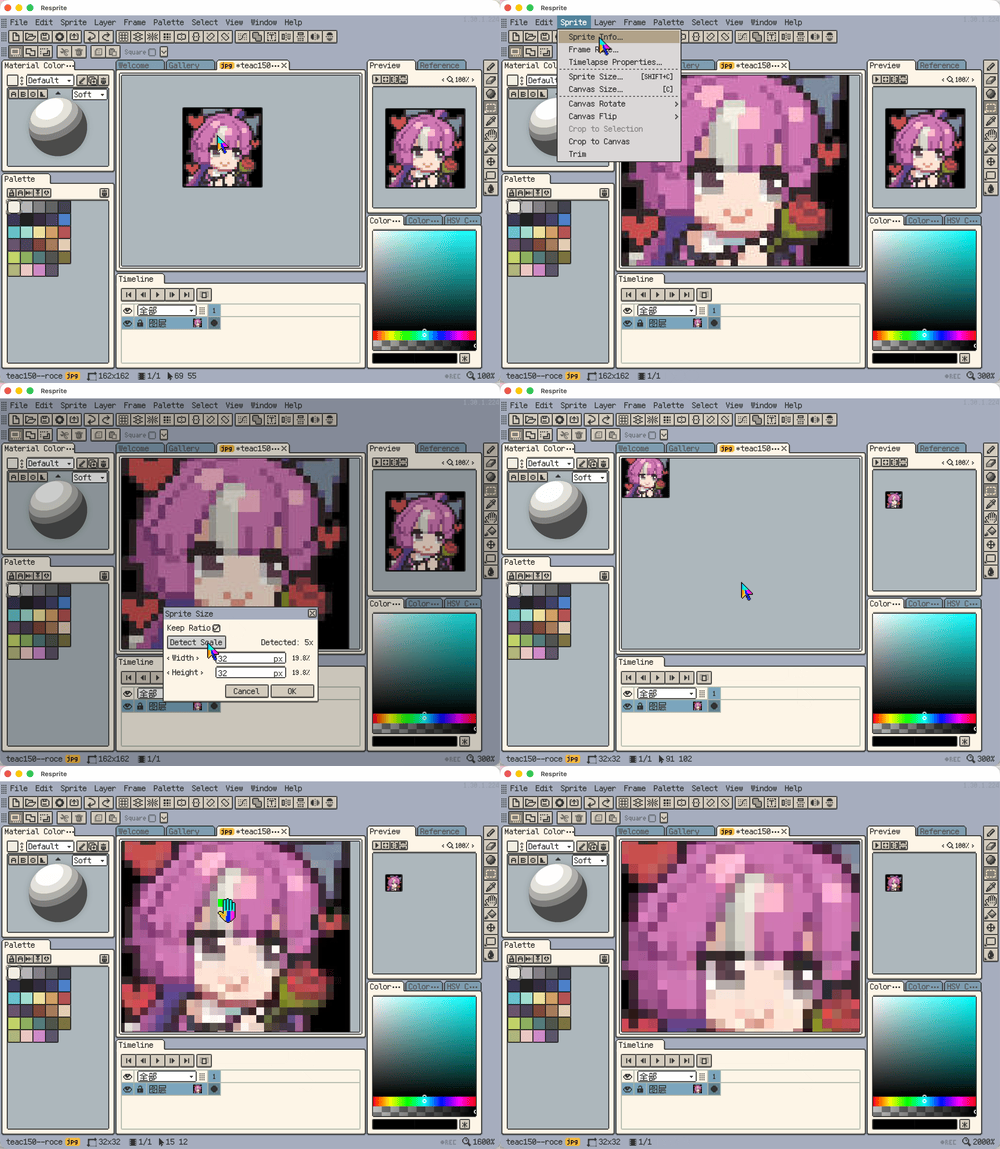
Highlights
- New: Added
Detect Scalein Sprite Size, so Resprite can suggest integer-upscaled target sizes automatically. - New: Desktop shortcut settings now support custom
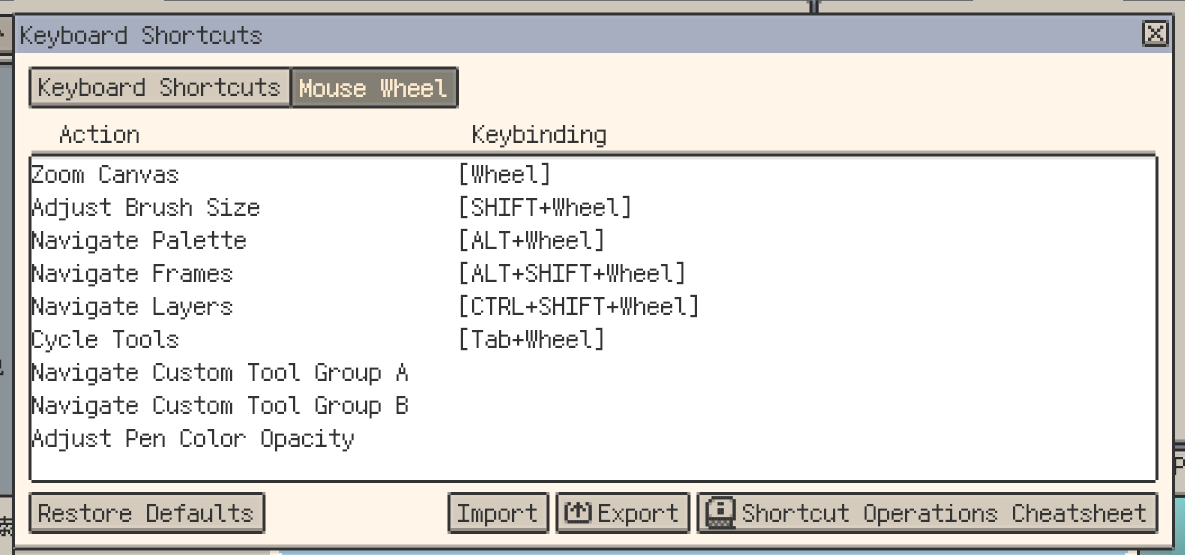
key + wheelbindings, with import, export, and default reset. - New: Added ellipse selection. Rectangle and ellipse selections now both support center drawing, and
Shiftcan lock proportions or switch to Add mode.

Workflow and Editing Improvements
- Improvement:
.rescurs/.rescurcursor packs can now be opened directly from Finder or File Explorer. - Improvement: Canvas viewport constraints are more stable after zooming, dragging, or resizing.
- Improvement: Unified
Fit to Viewwording across related surfaces. - Improvement: Unified canvas, preview, and reference zoom steps down to 1%.
- Improvement: Insert Text now supports
.otf, and same-name.ttf/.otffonts can be previewed and inserted separately. - Improvement: Reorganized shortcut settings categories and ordering, and split Layer and Frame entries.
- Improvement: Desktop shortcut cheatsheets are cleaner, with more consistent wording.
- Improvement: Exported shortcut cheatsheets now include shortcuts, wheel actions, gestures, and modifier behaviors in one sheet.
- Improvement: Removed the old Help-menu cheatsheet to avoid overlap with the new exported cheatsheet and Quick Start.
- Improvement: Timeline clip selection and edge dragging now feel smoother.
- Improvement:
Merge Visibleon desktop is now more intuitive.
Palette, Gallery, and Export Polish
- Improvement: Bead Pattern export now supports separate major/minor grid colors and widths, and remembers the last-used style.
- Improvement: Unified Gallery naming for Duplicate and Copy/Paste.
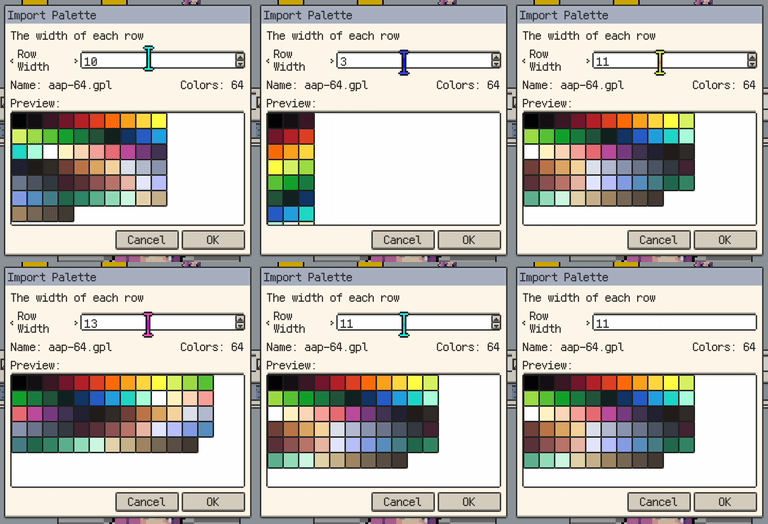
- Improvement: The GPL palette row-width dialog now previews layouts in real time.
- Improvement: Added
Clear Recentto recent projects. - Improvement: Layer-selection blink is now softer and stays focused on the final layer during rapid switching.
Fixes
- Fix: Fixed timeline clicks incorrectly limiting whole-sprite adjustments, outlines, and moves.
- Fix: Fixed occasional duplicate palette import on macOS cold start.
- Fix: Fixed broken back/forward history after
Go to Parentin Gallery. - Fix: Fixed Bead Pattern preview border and major/minor grid option sync.
- Fix: Fixed Gallery view mode resetting after restart on Android.
- Fix: Unified file type badges in desktop Recent and small-grid Gallery views.
- Fix: Fixed invalid file names when exporting by layer.
- Fix: Improved layer identity stability to reduce timeline issues after duplicate and undo/redo.
- Fix: Layer selection from the canvas now scrolls to the correct visible position when clip rows are shown in the timeline.
- Fix: Desktop palette clicks no longer fall into multi-select because of slight pointer wobble.
- Fix:
.respritesaving now validates pixel consistency and keeps the original file on failure. - Fix: Fixed incorrect display of long color names.
- Fix: Dragging a GPL palette into the current palette panel on desktop now asks for row width first.
- Fix: Fixed cut-then-paste in the same Gallery folder being renamed incorrectly on desktop.
- Fix: Fixed normal folders with dots being mistaken for project items.
- Fix: Fixed Gallery parent entry and Android file-name display in grid views.
- Fix: Faster palette generation from large images/reference images, with lower ANR risk.
- Fix: Fixed Android tools acting as if
Shift/Ctrlwere pressed without a physical keyboard. - Fix: Canvas position is now more stable after
Sprite Sizeand undo/redo.
Thanks for Reading
If you run into any issues or have suggestions, please contact us via the official support page: Support. Your feedback helps us keep improving Resprite.