Fonts
Download Resprite Font packs for pixel lettering, icons, and emoji. These bitmap fonts work on iOS, desktop, and Android through Insert Text.
The downloads use .resfont; .resprite-font files are also supported. For vector fonts, supported formats, and text layout controls, see Insert Text and Fonts.
Download featured fonts
-
Res-compact: compact connected mid-size font created by the Resprite team.

-
Res-emojis: emoji glyph set from the Resprite team.

-
Res-boxy: boxy display font inspired by classic pixel lettering and refined by the Resprite team.

-
Res-tiny: Pico-8 inspired small font designed by the Resprite team.

-
Res-regular: versatile mid-size typeface from the Resprite team.

-
GJ-TitleCase: title-case display font contributed by grymmjack.

Fonts prefixed with Res- are authored by the Resprite development team and are free to use inside the app.
Import fonts
- Download a font file from the collection above.
- Open the text window from Edit ▸ Insert Text.
- Use the + button in the font controls to import the file, then select the font and build your text from its character grid.
iOS
You can also open a supported font file from the Files app with Resprite. After importing, select it in the text window.
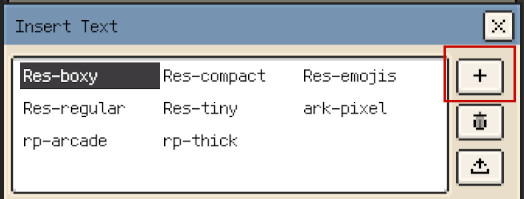
Desktop drag and drop
On desktop, you can also drag the downloaded font file into the text window.
For font management, text settings, and creating your own pixel font, see Insert Text and Fonts.
Contribute a font
To propose a font for this collection, send its .resfont file, compatible .resprite-font package, or download link through our support channels. Include the font name, creator, usage terms, and the attribution link you want displayed.